
- TL;DR
- The activation ceiling most programs never break
- What are multiple referral launchers?
- Why high-intent pages are the highest-leverage placement
- What does the data say about multiple launcher placement?
- Smoobu: 25% monthly activation with a FAB and a menu item
- How to implement multiple referral launchers with Cello
- Why Cello is the only referral platform built for this
TL;DR
- Multiple referral launchers drive 8.8x combined activation: the highest uplift available in Cello's Recommendations framework when paired with 1st-level visibility
- A launcher placed at a high-intent moment: upgrade, subscription, content sharing, team invitation, fires when users are already primed to share. Motivation and opportunity, aligned at the same second
- Smoobu implemented a floating action button (FAB) and a menu integration with a simple 10% two-sided reward. No complex tiers, no launch campaign, and reached 25% monthly activation and +10% monthly revenue growth
- window.Cello("open") turns any HTML element into a referral launcher in one line of code. No custom build required
- Including the reward amount in the launcher text adds 1.5x activation and +6 points, out of 100, to your Cello Score. A copy decision, not a development task
The activation ceiling most programs never break
Chapter 1 of this series established the foundation: your referral launcher must live in your primary navigation. That single placement change drives a 4.4x lift in activation. Users who see the referral program on every login develop the repeated exposure that converts passive awareness into first shares.
Chapter 2 covered what happens next: Essential Announcements fire at two behaviourally-defined trigger points. First, 3 days after initial launcher exposure. Second touchpoint, after 7 days a user earns their first reward, when a well-timed nudge converts awareness into action.
There is a third lever. It does not require modifying your notification logic or revisiting your reward structure. It requires a single question: where else in your product are users already thinking about sharing? That is where multiple referral launchers belong.
What are multiple referral launchers?
Multiple referral launchers are additional entry points to your referral program, placed at specific high-intent locations in your product UI. They work alongside your primary 1st-level launcher, not as a replacement for it.
The primary launcher creates ambient visibility. Multiple contextual launchers add intentional visibility: they appear at the exact moment a user is most naturally inclined to share. Instead of relying on users to remember the referral program exists. Contextual launchers meet them at the moment when referral is the obvious next action.
Technically, each additional launcher is a standard HTML element, a button, link, or any UI component, configured to open the Cello Referral Component via a single SDK call. From the user's perspective, the referral program appears naturally in the context where it is most relevant. From the engineering perspective, the implementation is one line of code per launcher.
Why high-intent pages are the highest-leverage placement
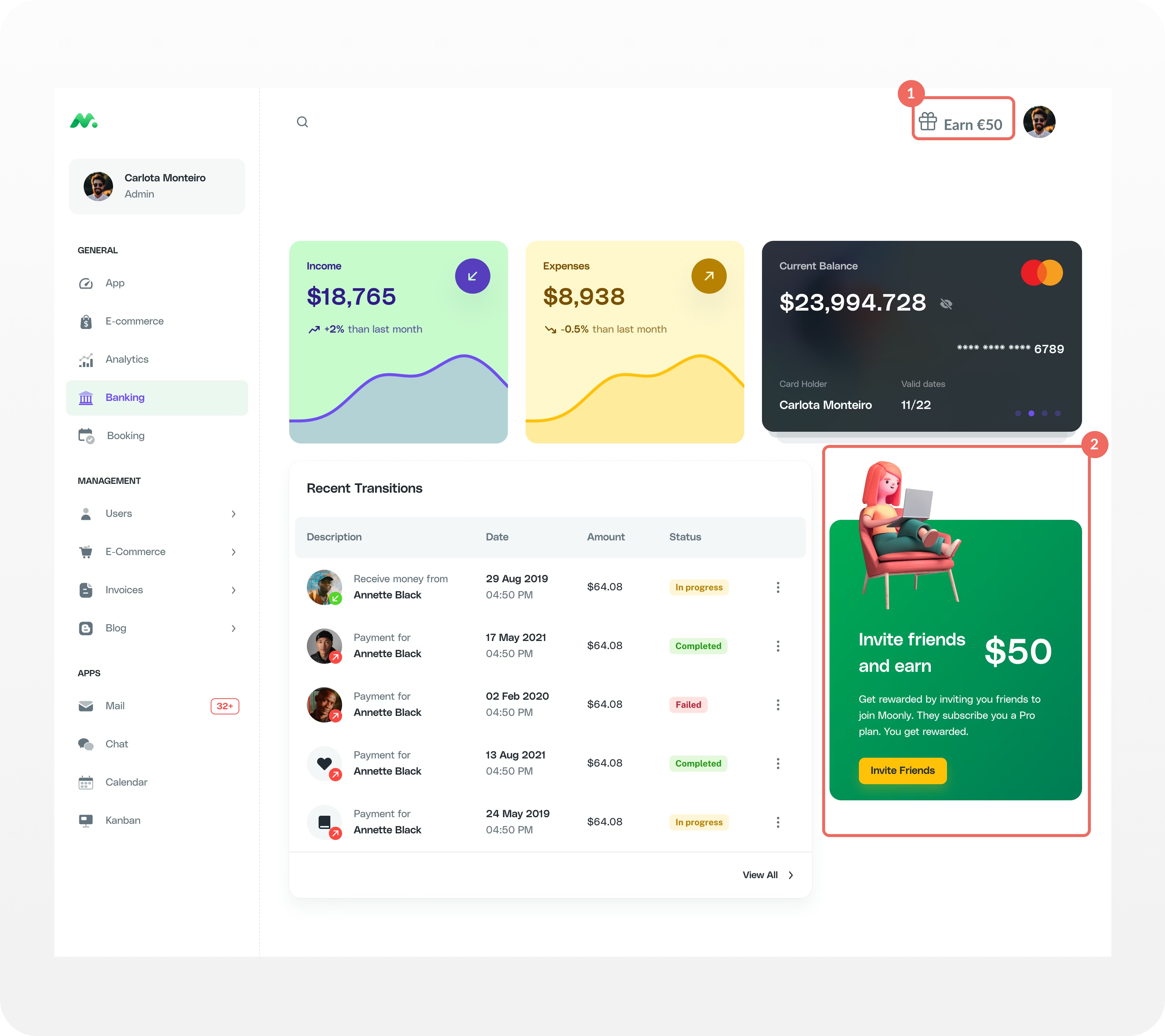
The behavioural logic is precise. At the moment a user completes a positive outcome, upgrading their plan, exporting content they're proud of, inviting a teammate to collaborate, their motivation to share is at a natural high. They have just demonstrated to themselves that your product delivers enough value to invest in. That is when a referral prompt converts.
This is categorically different from the motivation that ambient navigation creates. A referral link in the sidebar is a reminder. A referral prompt on the upgrade confirmation screen is relevance. The conversion gap between the two reflects the motivational gap at the moment of exposure.
Cello's analysis of 4M+ referral program users identifies four high-intent contexts that consistently outperform ambient placements:
- Upgrade and plan confirmation pages: users have just committed to the product
- Subscription management pages: users are actively engaged with the value exchange
- Content sharing or export flows: users are already in a sharing mindset
- Team invitation and collaboration flows: users are actively expanding their network inside your product
In each of these contexts, the referral prompt appears not as an interruption but as a logical extension of what the user is already doing.
What does the data say about multiple launcher placement?
Cello's dataset of 4M+ referral program users shows that adding multiple contextual launchers contributes +14 performance points, out of 100, to the Cello Score. The third-highest single Activation gain after 1st-level visibility (+21 pts), and essential announcements (+16 pts). Combined, the three discoverability layers account for +51 points before any reward structure or campaign optimisation.
| Configuration | Activation Rate | Cello Score Impact |
|---|---|---|
| 2nd-level menu only | 1x (baseline) | 0 pts |
| 1st-level visibility | 4.4x activation lift | +21 pts |
| + 1 custom contextual launcher | +3.5x additional uplift | +14 pts |
| 1st-level + multiple custom launchers | 8.8x combined | +35 pts |
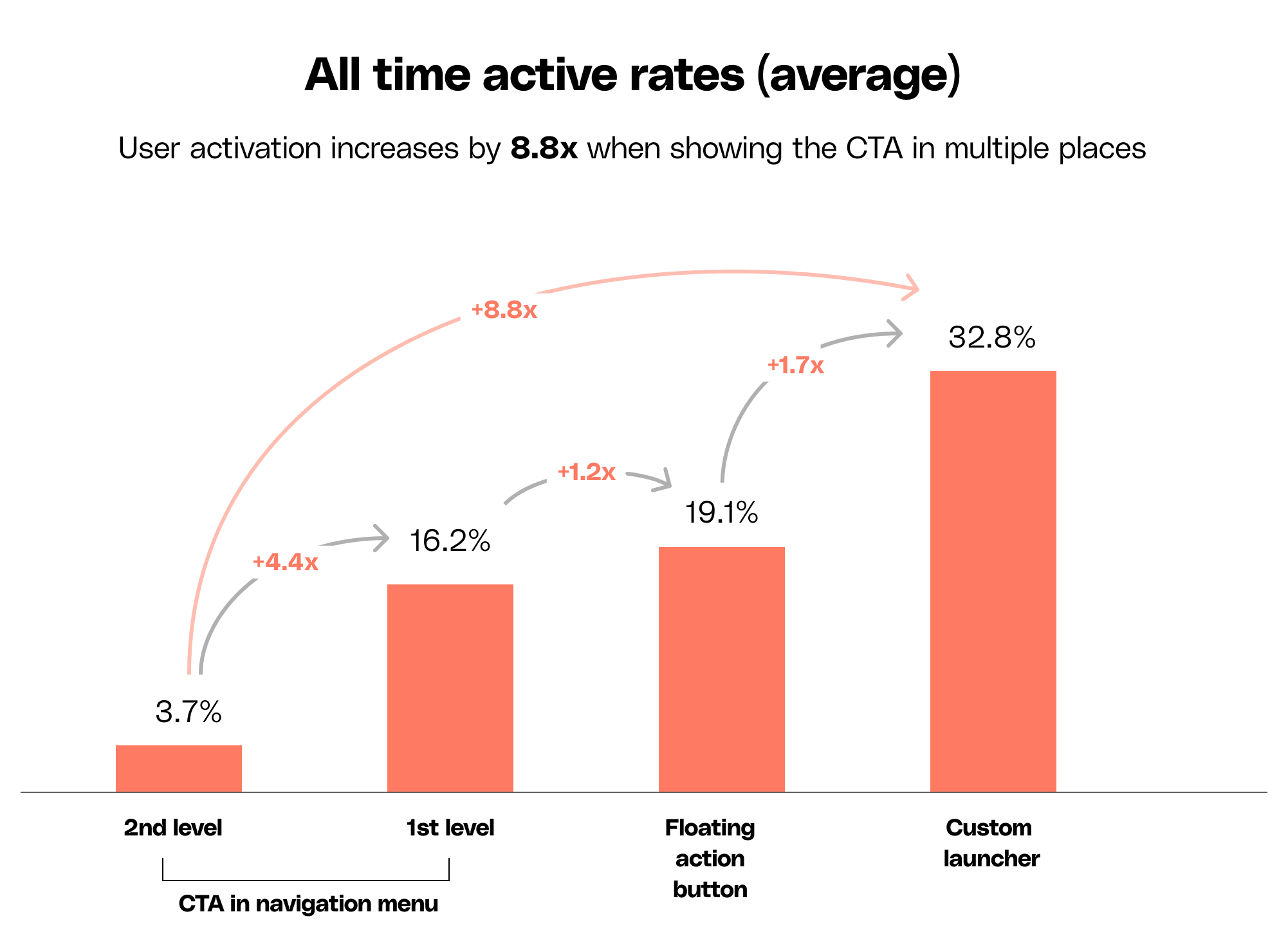
Cello's Discoverability Best Practices Guide also shows: including the reward amount directly in the launcher text increases activation by a further 1.5x and adds +6 points to the Cello Score. Beyond activation, the same copy change increases the sharing rate by 3.5x, referred friends are more likely to share in turn, compounding your referral loop. This is a copy decision, not a development task, that stacks directly on top of placement impact.
Smoobu: 25% monthly activation with a FAB and a menu item
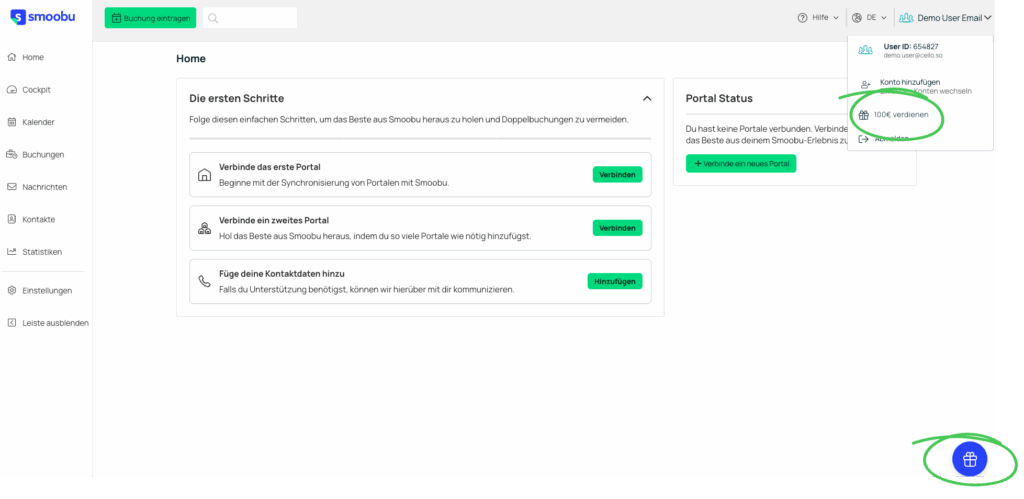
Smoobu is a Berlin-based vacation rental management SaaS, acquired by HomeToGo in 2020. They launched their Cello referral program with a deliberately simple setup: a symmetrical 10% two-sided reward, equal for referrer and referee, straightforward to communicate, and two launcher placements.
- A floating action button (FAB) permanently embedded in the product UI
- A direct in-menu integration in the main navigation
No complex reward tiers, dedicated launch campaign or developer-heavy build. The differentiation was entirely placement.
| Metric | Result |
|---|---|
| Monthly activation rate | 25% |
| Sharing rate | 17% |
| Free-trial-to-paid conversion (referred users) | 54.8% |
| Monthly additional revenue from referrals | +10% |
Smoobu's Multiple Referral Launchers
"Cello's Plug & Play widget has saved us valuable time and effort, making it easy to get started and see results quickly." Jannik Abraham, Managing Director, Smoobu
The Smoobu case answers a question that arises consistently in referral program planning: does reward structure determine results? Smoobu's 25% activation rate and +10% monthly revenue growth came from a standard symmetrical reward requiring no unusual incentive engineering. The result was driven by placement decisions. A visible program with a simple reward outperforms an invisible program with a generous one.
How to implement multiple referral launchers with Cello
Implementing multiple referral launchers requires no developer work beyond the initial Cello integration. Once Cello is live in your product, any HTML element can become a referral launcher.
Step 1: Identify your high-intent placement contexts
Work with your growth manager and UX designer to identify 2–4 locations in your product where users are already primed to share. The highest-performing contexts from Cello's data: upgrade confirmation screens, subscription pages, content sharing or export flows, and team invitation screens.
Step 2: Add the trigger
Use the window.Cello("open") method to open the Referral Component when any element is clicked. This single line of code turns any button, link, or UI element into a referral launcher: Full SDK documentation.
Step 3: Include the reward amount (recommended)
Use the getLabels() method to retrieve your configured reward text and populate the launcher copy dynamically. The reward label updates automatically when your campaign configuration changes in the Cello Portal. No code changes required.
Displaying the reward amount in launcher text adds 1.5x activation lift and 3.5x sharing rate boost, plus +6 pts to your Cello Score.
Step 4: Configure in Cello Portal
Navigate to Cello Portal → Referrer Experience and set the Custom Launcher Selector to match the HTML identifier of your element. For an ID selector: #cello-launcher. For a class: .cello-launcher. No code deployment required. Setup takes under 5 minutes per launcher.
Technical requirements for all custom launchers:
- The launcher element must exist in the DOM before Cello initializes
- The element must have position: relative CSS styling
- Cello does not automatically rescan the DOM for new elements after initialization
- For single-page apps: keep the element persistent in the DOM and use display: none to control visibility, rather than conditional rendering
Why Cello is the only referral platform built for this
The architectural difference is structural. Most referral tools are built around a single hosted landing page, the referral experience lives outside your product, which makes contextual placement technically impossible without custom development. Cello's Referral Component is designed to embed natively inside your product UI. That is why window.Cello("open") works from any element: you are not linking to an external flow, you are opening a component that already lives inside your product.
| Capability | Cello | Most Referral Tools |
|---|---|---|
| Multiple contextual launcher support | ✓ Any HTML element, any page | ✗ Single hosted widget |
| Trigger method | ✓ window.Cello("open") — one line of code | ✗ Not natively available |
| Reward text in launcher copy | ✓ getLabels() API, auto-populated | ✗ Not available |
| Notification badge on custom launcher | ✓ Configurable (with or without badge) | ✗ Not available |
| Activation performance score | ✓ Real-time Cello Score, Recommendations dashboard | ✗ Not available |
| No-dev configuration | ✓ Cello Portal, Custom Launcher Selector | ✗ Requires custom development |
Multiple launchers are not a growth tactic layered on top of a referral program. They are the third structural layer of a program that converts, after 1st-level visibility establishes where users can always find it, and Essential Announcements address the timing gap between awareness and first action. Contextual launchers close the loop by placing the referral program where users already are, at the moment they are most ready to use it.
With all three layers active, 1st-level visibility (+21 pts), Essential Announcements (+16 pts), and multiple launchers (+14 pts), your program has the foundational activation infrastructure that every advanced optimisation builds on.
What is the difference between a primary launcher and a contextual launcher?
Your primary launcher is the 1st-level navigation launcher, permanently visible on every screen in your product. A contextual launcher is an additional entry point placed on a specific high-intent page, configured to open the same Referral Component via window.Cello("open"). Both types open the same referral experience. The contextual launcher adds intent-specific placement on top of ambient visibility.
How many contextual launchers should I add?
Cello's recommendation is to start with 2–3 placements at the highest-intent moments in your product, then expand based on activation data. The highest-performing contexts are upgrade confirmation screens, subscription pages, content sharing or export flows, and team invitation screens. Adding launchers beyond the top 3–4 high-intent contexts typically shows diminishing returns.
Does implementing multiple launchers require developer work?
No developer work is required beyond the initial Cello integration. The trigger method, window.Cello("open"), is a single line of JavaScript. Portal configuration for the Custom Launcher Selector takes under 5 minutes and requires no code deployment. If Cello is already live in your product, adding a contextual launcher is a frontend task, not an infrastructure change.
What is the combined performance impact of 1st-level visibility and multiple launchers?
based on Cello's analysis of 4M+ referral program users, 1st-level visibility contributes +21 Cello Score points and 4.4x activation lift. Adding multiple contextual launchers contributes an additional +14 points. Combined, the two discoverability layers produce 8.8x activation lift and +35, out of 100, Cello Score points, before any reward, notification, or campaign optimisation.
Can I display the reward amount directly in a contextual launcher?
Yes. Use window.Cello("getLabels") to retrieve your configured reward text and populate the launcher copy dynamically. Including the reward amount increases activation by 1.5x and adds +6 points to the Cello Score. The label updates automatically when your campaign configuration changes in the Cello Portal, no code changes required.
Do I need to configure each contextual launcher separately in Cello Portal?
Each custom launcher needs its HTML element to match the selector configured in Cello Portal → Referrer Experience. Multiple elements can share the same class selector, allowing batch configuration. The technical requirement, element must exist in DOM before Cello initializes and must have position: relative, applies to all custom launchers.
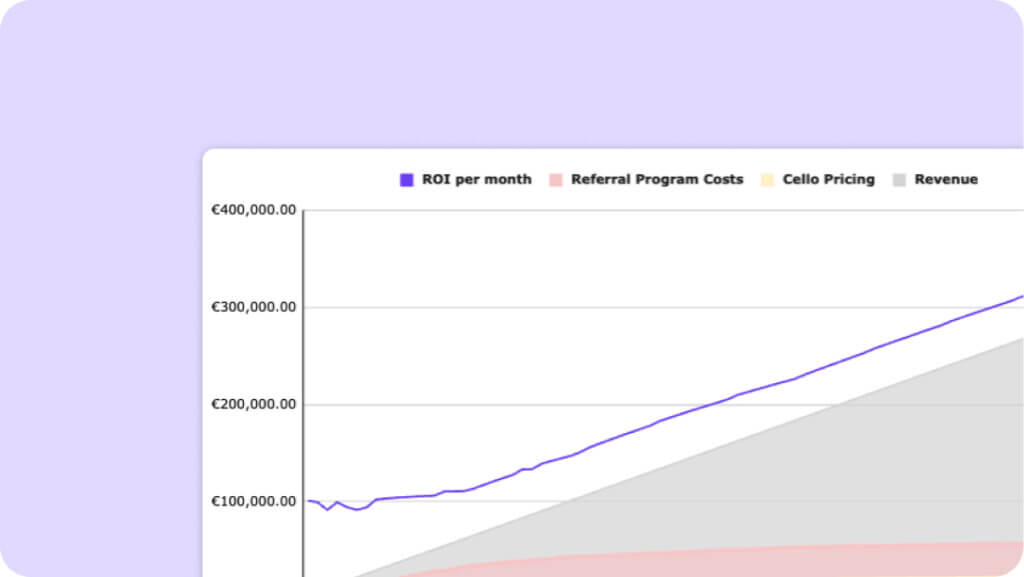
Referral Program ROI Calculator
Learn how to estimate and prove the ROI of your PLG Referral Program